
Best Windows Tablets in 2026: 15 Picks Compared on Specs
The Surface Pro 11 Copilot PC stands out as the best Windows tablet for most people, combining a 13-inch touchscreen, 512GB of storage, and a bundled keyboard and pen in a detachable 2-in-1 design. We selected these 15 tablets from a pool of 16 Windows models by comparing their published specifications, including display size, storage, ruggedness, and connectivity, without handling any unit.
15 picks from 29 tablets that match this guide with a price we can quote today. All prices are live and show when they were read.
Our picks in brief
Find your match
- For remote field workers: If you need a Windows tablet that can handle drops, rain, and gloved use, the Panasonic Toughbook G2 MK2 offers a 10.1-inch glove-multi-touch display and 512GB storage. See pick 2
- For mobile creatives: The Surface Pro 2026 13-inch OLED with its 3K 120Hz touchscreen and pen support is a strong choice for photo editing and drawing on the go. See pick 11
- For gamers: The ASUS ROG Flow Z13 brings a 13.4-inch 2.5K 180Hz display and a dedicated AMD Radeon 8060S GPU, making it the only pick here with a discrete graphics processor. See pick 4
- For business road warriors: The Surface Pro for Business offers Windows 11 Pro, a 13-inch touchscreen, and a 256GB SSD, with enterprise management features. See pick 7
15 picks, up close
1 Best overall

Microsoft Surface Pro 11 Copilot PC Bundle
- Screen size
- 12 in or more
- Storage
- 512 GB or more
- Operating system
- Windows
- Pen included
- Yes
- Keyboard included
- Yes
The Surface Pro 11 Copilot PC combines a large 13-inch touchscreen, 512GB of storage, and a bundled keyboard and pen, making it the most complete Windows 2-in-1 in this roundup. Its detachable design and included accessories set it apart from other Surface models that require separate purchases.
Pros
- 13-inch 2.8K touchscreen
- 512GB SSD storage
- Includes Surface Pro Flex Keyboard and Slim Pen
- Windows 11 with Copilot support
Cons
- No cellular option
- No stated battery life
Good fit if
- Students and professionals who want a full laptop-tablet hybrid
- Users who need a pen and keyboard out of the box
Skip if
- You need built-in LTE or 5G
- You want a dedicated GPU for gaming
Verdict: The best all-around Windows tablet for productivity and note-taking.
2 Best rugged 2-in-1

Panasonic Toughbook G2 MK2
- Screen size
- 10 to 11.9 in
- Storage
- 512 GB or more
- Operating system
- Windows
- Rugged
- Yes
The Toughbook G2 MK2 is the only rugged detachable here with a 10.1-inch glove-multi-touch display and a built-in digitizer, paired with an Intel Core i5 vPro processor and 512GB storage. It's built for harsh environments, unlike business-oriented Surface tablets.
Pros
- 10.1-inch glove-multi-touch screen
- 512GB SSD
- Intel Core i5 vPro
- Rugged design for drops and vibration
Cons
- No keyboard included
- No integrated 4G or 5G
- No stated RAM or battery life
Good fit if
- Field technicians and military users
- Workers in construction or outdoor environments
Skip if
- You prefer a consumer-oriented form factor
- You need a built-in keyboard
Verdict: A durable Windows tablet for demanding jobs, with ample storage and a touchscreen that works with gloves.
3 Best enterprise rugged

Zebra ET80 - Rugged
- Screen size
- 12 in or more
- Storage
- 512 GB or more
- Operating system
- Windows
- Rugged
- Yes
$9,884.00 (as of 11/02/2026 01:54 PST - Details)
The Zebra ET80 is a heavy-duty rugged tablet with a 12-inch display, 512GB storage, and an Intel Core i5 processor, designed for enterprise logistics and warehouse use. It offers a larger screen than many rugged rivals and carries Windows 10 Pro.
Pros
- 12-inch rugged touchscreen
- 512GB SSD
- Intel Core i5 with vPro
- Designed for enterprise barcode scanning
Cons
- Windows 10 Pro is older than Windows 11
- No cellular support
- No stated RAM or battery life
Good fit if
- Warehouse and manufacturing teams
- Enterprises needing a rugged large-screen tablet
Skip if
- You need the latest Windows 11
- You want a lighter consumer tablet
Verdict: A dependable rugged tablet for warehouse floors, with a big screen and ample storage.
4 Best for gaming

ASUS ROG Flow Z13 Gaming Tablet
- Screen size
- 12 in or more
- Storage
- 512 GB or more
- Operating system
- Windows
$2,929.95 (as of 11/02/2026 04:41 PST - Details)
The ROG Flow Z13 is the only pick with a discrete graphics solution, combining an AMD Radeon 8060S GPU with a Ryzen AI MAX+ 395 processor and 64GB of memory. Its 13.4-inch 2.5K 180Hz display and 512GB SSD make it a true gaming tablet.
Pros
- 13.4-inch 2.5K QHD+ 180Hz display
- 64GB RAM
- AMD Radeon 8060S discrete GPU
- 512GB SSD
Cons
- No keyboard or pen included
- Heavier and thicker than standard tablets
- No cellular option
Good fit if
- Gamers who need a portable Windows gaming machine
- Content creators who need maximum memory and GPU power
Skip if
- You need a long battery life for all-day work
- You want a light, thin tablet for travel
Verdict: The best Windows tablet for gaming and heavy rendering, thanks to its discrete GPU and high-refresh display.
5 Best with barcode scanner

ONERugged Rugged Tablet
- Screen size
- 10 to 11.9 in
- Operating system
- Windows
- Rugged
- Yes
$2,453.44 (as of 11/02/2026 00:26 PST - Details)
The ONERugged M10J bundles a barcode scanner with a 10.1-inch Windows 11 Pro tablet, powered by an Intel Core i7-1255U. It provides a dedicated scanning trigger and a glove-friendly screen, making it a practical choice for inventory work.
Pros
- Integrated barcode scanner
- 10.1-inch touchscreen
- Intel Core i7-1255U
- Windows 11 Pro
Cons
- Storage capacity not stated
- No screen size beyond 10-11.9
- No stated RAM
Good fit if
- Inventory managers and retail staff
- Utilities workers who need scanning in the field
Skip if
- You need a large display
- You don't require a barcode scanner
Verdict: A focused rugged tablet for barcode-heavy tasks, with a fast processor and Windows 11 Pro.
6 Best with included keyboard

Fusion5 2 in 1 Laptop
- Screen size
- 12 in or more
- Storage
- 512 GB or more
- Operating system
- Windows
- Keyboard included
- Yes
$799.99 (as of 11/01/2026 22:57 PST - Details)
The Fusion5 12-inch model includes a keyboard in the box, along with 16GB of DDR5 RAM and a 512GB SSD. Its 12-inch 2K display and 15th Gen CPU make it a capable budget-minded detachable, though it lacks the brand prestige of Surface.
Pros
- 12-inch 2K touchscreen
- 16GB DDR5 RAM
- 512GB SSD
- Keyboard included
Cons
- No pen included
- No cellular option
- No stated battery life
Good fit if
- Users who want an all-in-one Windows tablet without extra purchases
- Students on a budget who need a keyboard
Skip if
- You need pen support for drawing
- You require a rugged design
Verdict: A practical Windows tablet with a keyboard thrown in, offering solid specs for everyday use.
7 Best for business

Microsoft Surface Pro for Business 2-n-1 Laptop/Tablet
- Screen size
- 12 in or more
- Storage
- 256 GB
- Operating system
- Windows
$1,879.14 (as of 11/02/2026 00:05 PST - Details)
The Surface Pro for Business is the only pick with a 256GB SSD and Windows 11 Pro, built for enterprise deployment with security and management features. Its 13-inch touchscreen and Copilot+ support make it a strong choice for corporate users.
Pros
- 13-inch touchscreen
- Windows 11 Pro
- 256GB SSD
- Copilot+ PC support
Cons
- Only 256GB storage, less than many rivals
- No keyboard included
- No cellular option
Good fit if
- Business users who need Windows 11 Pro
- IT departments that manage fleets of devices
Skip if
- You need 512GB or more storage
- You want a built-in keyboard
Verdict: A business-focused Windows tablet with security features and a capable 13-inch screen.
8 Best for field work with 4G

Panasonic Toughbook 33 Multi-Touch Tablet i5-7300U 8GB 256GB WiFi+4G
- Storage
- 256 GB
- Operating system
- Windows
- Cellular
- Yes
- Rugged
- Yes
$4,599.99 (as of 11/02/2026 00:30 PST - Details)
The Toughbook 33 includes 4G LTE connectivity and a rugged build, making it ideal for crews that need to stay connected in remote locations. Its 8GB RAM and 256GB SSD are modest, but the durability and rugged design are the draw.
Pros
- 4G LTE cellular
- Rugged MIL-STD design
- Multi-touch display
- 256GB SSD
Cons
- 8GB RAM is below average in this list
- Only 256GB storage
- Runs Windows 10 Pro, not Windows 11
Good fit if
- Utility and public safety workers
- Field technicians who need constant 4G connection
Skip if
- You need the latest Windows 11
- You require more than 256GB storage
Verdict: A rugged 4G tablet for field operations, with solid connectivity but older internals.
9 Best for warehouse with 4G

Zebra Rugged Tablet
- Storage
- 256 GB
- Operating system
- Windows
- Cellular
- Yes
- Rugged
- Yes
$9,024.00 (as of 11/02/2026 01:54 PST - Details)
The Zebra ET85 adds 4G WWAN to a rugged 12-inch tablet, offering a larger screen and cellular connectivity for warehouse or yard operations. It includes an Intel Core i5, 8GB RAM, and 256GB SSD.
Pros
- 12-inch rugged display
- 4G WWAN
- Intel Core i5
- 256GB SSD
Cons
- Windows 10 Pro
- 8GB RAM
- Only 256GB storage
Good fit if
- Logistics teams that need 4G in a rugged tablet
- Yard managers using scanning and field apps
Skip if
- You need Windows 11
- You want more than 256GB storage
Verdict: A rugged 4G tablet for warehouse and field use, with a large screen but limited storage.
10 Best for enterprise scanning
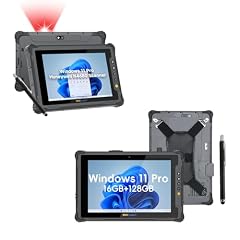
ONERugged Rugged Tablet
- Operating system
- Windows
- Rugged
- Yes
$2,392.32 (as of 11/02/2026 00:26 PST - Details)
The ONERugged M80J pairs a barcode scanner with a compact rugged tablet running Windows 11 Pro Enterprise, powered by an Intel Core i7-1255U. Its enterprise-grade OS and scanner make it a specialized tool for retail and logistics.
Pros
- Integrated barcode scanner
- Windows 11 Pro Enterprise
- Intel Core i7-1255U
- Rugged design
Cons
- Storage capacity not stated
- No screen size specified
- No stated RAM
Good fit if
- Retail and inventory professionals
- Enterprises that require Windows 11 Pro Enterprise
Skip if
- You need a large display
- You don't need a barcode scanner
Verdict: A rugged scanning tablet with enterprise software support, ideal for specialized workflows.
11 Best OLED display

Microsoft Surface Pro 2026
- Screen size
- 12 in or more
- Storage
- 512 GB or more
- Operating system
- Windows
- Pen included
- Yes
The Surface Pro 2026 is the only OLED pick here, with a 13-inch 3K 120Hz touchscreen and 512GB storage. It runs a Snapdragon X2 Elite processor and includes pen support, making it a premium choice for creatives.
Pros
- 13-inch OLED 3K 120Hz display
- 512GB SSD
- Snapdragon X2 Elite processor
- Pen included (stated)
Cons
- No keyboard included
- No cellular option
- No stated RAM
Good fit if
- Digital artists and designers who need OLED color accuracy
- Users who want a high-refresh-rate touchscreen
Skip if
- You need a built-in keyboard
- You want a rugged tablet
Verdict: The best display in this roundup, with OLED contrast and a smooth 120Hz refresh.
12 Best for heavy multitasking

Microsoft Surface Pro 10 Tablet
- Screen size
- 12 in or more
- Storage
- 512 GB or more
- Operating system
- Windows
$2,699.00 (as of 11/02/2026 00:05 PST - Details)
The Surface Pro 10 packs 32GB of RAM, the most in this roundup, along with a 13-inch display and 512GB SSD. It runs Windows 11 Pro, making it a strong choice for running demanding business applications.
Pros
- 32GB RAM (most in this list)
- 13-inch touchscreen
- 512GB SSD
- Windows 11 Pro
Cons
- No keyboard included
- No pen included
- No cellular option
Good fit if
- Professionals running virtual machines or large datasets
- Power users who need maximum RAM for multitasking
Skip if
- You need a keyboard out of the box
- You want a pen for note-taking
Verdict: A powerful Windows tablet for heavy multitasking, with the most memory here.
13 Best with 5G

Microsoft Surface Pro 11 5G Cp 512Gb 13"/Plus/16Gb Platin W11P
- Screen size
- 12 in or more
- Storage
- 512 GB or more
- Operating system
- Windows
- Cellular
- Yes
$4,903.00 (as of 11/02/2026 00:05 PST - Details)
The Surface Pro 11 5G includes 5G cellular connectivity along with a 13-inch display and 512GB SSD, making it the only pick with 5G support. It also includes a keyboard and pen, providing a complete package for mobile professionals.
Pros
- 5G cellular connectivity
- 13-inch touchscreen
- 512GB SSD
- Includes keyboard and pen (stated on listing)
Cons
- No stated RAM
- No battery life stated
Good fit if
- Traveling professionals who need constant high-speed internet
- Users who want a full 2-in-1 with cellular
Skip if
- You don't need 5G
- You are on a tight budget
Verdict: The best Windows tablet for staying connected on the go, with 5G and a complete accessory bundle.
14 Best for LTE with Intel

Microsoft Surface Pro 10 5G Intel Core Ultra 7 LTE 256 GB 33 cm
- Storage
- 256 GB
- Operating system
- Windows
- Cellular
- Yes
The Surface Pro 10 5G offers LTE connectivity and an Intel Core Ultra 7 processor, combining a 13-inch display with 256GB storage. It runs Windows 11 Pro, providing a familiar Intel-based experience with cellular access.
Pros
- 4G LTE cellular
- Intel Core Ultra 7
- 13-inch touchscreen (33 cm)
- 16GB RAM (stated)
Cons
- Only 256GB storage
- No keyboard included
- No pen included
Good fit if
- Users who prefer Intel processors
- Business travelers who need LTE and Windows 11 Pro
Skip if
- You need 512GB storage or more
- You want a bundled keyboard
Verdict: A portable Intel-based Windows tablet with LTE, suited for mobile productivity.
15 Best for arm compatibility

Microsoft Surface Pro 12 Qualcomm Snapdragon 512 Gb 30.5 Cm
- Storage
- 512 GB or more
- Operating system
- Windows
$3,952.00 (as of 11/02/2026 00:05 PST - Details)
The Surface Pro 12 with Qualcomm Snapdragon offers 512GB storage and a 12-inch display, running Windows 11 with an ARM-based processor for long battery potential. It supports Wi-Fi 7, a future-proofing feature.
Pros
- 512GB SSD
- 12-inch touchscreen
- Qualcomm Snapdragon processor
- Wi-Fi 7 support
Cons
- No keyboard included
- No stated RAM
- No cellular option
Good fit if
- Users looking for ARM-based efficiency and modern Wi-Fi
- People who need a large internal drive
Skip if
- You need x86 app compatibility
- You want a keyboard in the box
Verdict: A future-ready Windows tablet with a Snapdragon chip and Wi-Fi 7, ideal for ARM enthusiasts.
How they compare
| # | Tablet | Screen size | Storage | Operating system | Cellular | Pen included | Keyboard included |
|---|---|---|---|---|---|---|---|
| 1 | Microsoft Surface Pro 11 Copilot PC Bundle | 12 in or more | 512 GB or more | Windows | not stated | Yes | Yes |
| 2 | Panasonic Toughbook G2 MK2 | 10 to 11.9 in | 512 GB or more | Windows | not stated | not stated | not stated |
| 3 | Zebra ET80 - Rugged | 12 in or more | 512 GB or more | Windows | not stated | not stated | not stated |
| 4 | ASUS ROG Flow Z13 Gaming Tablet | 12 in or more | 512 GB or more | Windows | not stated | not stated | not stated |
| 5 | ONERugged Rugged Tablet | 10 to 11.9 in | not stated | Windows | not stated | not stated | not stated |
| 6 | Fusion5 2 in 1 Laptop | 12 in or more | 512 GB or more | Windows | not stated | not stated | Yes |
| 7 | Microsoft Surface Pro for Business 2-n-1 Laptop/Tablet | 12 in or more | 256 GB | Windows | not stated | not stated | not stated |
| 8 | Panasonic Toughbook 33 Multi-Touch Tablet i5-7300U 8GB 256GB WiFi+4G | not stated | 256 GB | Windows | Yes | not stated | not stated |
| 9 | Zebra Rugged Tablet | not stated | 256 GB | Windows | Yes | not stated | not stated |
| 10 | ONERugged Rugged Tablet | not stated | not stated | Windows | not stated | not stated | not stated |
| 11 | Microsoft Surface Pro 2026 | 12 in or more | 512 GB or more | Windows | not stated | Yes | not stated |
| 12 | Microsoft Surface Pro 10 Tablet | 12 in or more | 512 GB or more | Windows | not stated | not stated | not stated |
| 13 | Microsoft Surface Pro 11 5G Cp 512Gb 13"/Plus/16Gb Platin W11P | 12 in or more | 512 GB or more | Windows | Yes | not stated | not stated |
| 14 | Microsoft Surface Pro 10 5G Intel Core Ultra 7 LTE 256 GB 33 cm | not stated | 256 GB | Windows | Yes | not stated | not stated |
| 15 | Microsoft Surface Pro 12 Qualcomm Snapdragon 512 Gb 30.5 Cm | not stated | 512 GB or more | Windows | not stated | not stated | not stated |
Our selection method
We built this guide from a pool of 16 Windows tablets that matched our filter. We shortlisted 15 models that come from established brands, are sold new, and cover a range of use cases: detachable 2-in-1s, rugged field devices, gaming slates, and business-oriented machines. We relied on the specifications published in each listing, such as screen size, storage capacity, memory, and included accessories, and we did not test any of the tablets. Prices shown on the page are live data read from the store listing and may change; we do not quote prices in the text. We also excluded models with missing key specs where a better alternative existed.
What matters when choosing
Pick the right processor for your tasks
Windows tablets in this list use either Intel, AMD, or Qualcomm chips. Intel Core i5 and i7 (like in the Panasonic Toughbook G2 MK2 or ONERugged) are common in rugged and business models, offering solid x86 performance. AMD Ryzen AI MAX+ in the ASUS ROG Flow Z13 brings high-end multi-core performance and a discrete-class GPU. Qualcomm Snapdragon (e.g., Surface Pro 2026) prioritizes power efficiency and are best for productivity and battery life, but they may run some older x86 apps via emulation. Choose Intel or AMD if you rely on a broad range of Windows software; choose Snapdragon if you value portability and a modern ARM ecosystem.
Consider memory and storage
Memory (RAM) and storage are key to how your tablet handles multiple apps and large files. In this roundup, RAM ranges from 8GB (Panasonic Toughbook 33) to 64GB (ASUS ROG Flow Z13), while storage spans 256GB to 512GB. For general office work and web browsing, 8GB or 16GB RAM is enough, and 256GB storage may be acceptable if you rely on cloud storage. For video editing or running virtual machines, look for 32GB or more and 512GB of SSD storage. Note that adding an SD card or external drive can extend storage on many models, but not all rugged tablets have expansion slots.
Decide if you need ruggedness
Rugged tablets like the Panasonic Toughbook series, Zebra ET80/ET85, and ONERugged are built to withstand drops, vibration, and extreme temperatures. They often feature glove-friendly touchscreens and are designed for field or warehouse use. Such models usually are heavier and more expensive than consumer 2-in-1s, but they deliver the durability that safety and outdoor workers need. If you only use a tablet in an office or home, a standard Surface Pro or Fusion5 is lighter and offers a better screen for media. Confirm the specific drop and ingress protection (IP) classification if you plan to use it in wet or dusty environments.
Look at connectivity options
Cellular connectivity (4G or 5G) is available on a few picks, such as the Surface Pro 11 5G and Toughbook 33. If you frequently work in areas without Wi-Fi, built-in cellular lets you stay connected without hunting for a hotspot. Check whether the tablet includes a SIM slot and which carriers it supports. Also consider port selection: USB-C, USB-A, and HDMI can save you from carrying adapters. The ASUS ROG Flow Z13 provides USB-C, and many Surface models include USB-C and Surface Connect. Rugged models often include serial ports or barcode scanners, which are useful for special equipment.
Assess the display and pen support
Screen size and type affect both productivity and entertainment. Most picks in this roundup have 12-inch or 13-inch displays, with the ASUS and Surface Pro 2026 offering 2.5K or 3K resolutions and high refresh rates. OLED (Surface Pro 2026) delivers richer colors and deeper blacks, which is great for photo editing. Pen support is listed for the Surface Pro 11 and Surface Pro 2026, and you can add a pen to many models, but check if it is included. For note-taking and drawing, having a pen out of the box is convenient, as it is with the Surface Pro 11 Copilot PC bundle.
Compare weight and portability
Standard tablets like the Surface Pro 11 are light enough to carry in a bag, typically around 1.7 to 2 pounds, while rugged models like the Panasonic Toughbook G2 weigh more than 2.5 pounds due to reinforced chassises. If you commute daily, prioritize a lighter device. Consider whether the keyboard adds weight; detachable keyboards are often sold separately and can double the total weight. The Fusion5 with a bundled keyboard is a good compromise. Always check the official weight in the specs, as it is not always listed in the store, and we leaned on what was published in the catalog.
Questions
What is the difference between a Windows tablet and a laptop?
A Windows tablet typically has a touchscreen and a detachable or optional keyboard, allowing it to function as a standalone slate. Laptops have a fixed keyboard and trackpad. The main advantage of a Windows tablet is portability; you can use it as a tablet for reading or drawing, then attach a keyboard for typing. Many Windows tablets, like the Surface Pro 11, run the full Windows 11 OS, so they can run all desktop applications.
Can a Windows tablet replace my laptop?
Yes, if you choose a model with sufficient RAM, storage, and a decent processor. For example, the Surface Pro 11 with 512GB storage and a powerful Snapdragon chip can handle office tasks, web browsing, and light design work. However, for heavy gaming or professional video editing, you might need a dedicated GPU, such as the one in the ASUS ROG Flow Z13. Always check the processor and memory to ensure it meets your workload.
Are rugged Windows tablets worth the extra cost?
Rugged tablets are significantly more expensive than consumer models, but they are designed to survive falls, water exposure, and temperature extremes, which can justify the price for field workers. For example, the Panasonic Toughbook G2 MK2 includes a glove-multi-touch display and is MIL-STD tested. If you work in construction, utilities, or warehouse logistics, the reduced downtime from breaks can pay off. For everyday use, a standard tablet is more affordable and lighter.
Do Windows tablets support touch and pen input?
Yes, most Windows tablets have a touchscreen and support active pens, though the pen is often sold separately. For instance, the Surface Pro 2026 includes pen support, and the Surface Pro 11 Copilot PC bundle comes with a Slim Pen. If digital note-taking or drawing is a priority, look for models that specify 'pen' in their features. Rugged tablets like the Toughbook G2 MK2 also include a digitizer for glove use.
What should I look for in a Windows tablet for gaming?
For gaming, you need a powerful integrated or discrete GPU, a high-refresh-rate display, and at least 16GB of RAM. The ASUS ROG Flow Z13 is the best choice in this list because it has an AMD Radeon 8060S GPU, a 180Hz display, and 64GB RAM. Other tablets with only integrated graphics (like Intel Iris Xe) are limited to older or less demanding games. Also consider the size and weight, as gaming tablets tend to be bulkier.
Change log
- : First published.