
Best Large Screen Tablets in 2026: 14 Picks Compared on Specs
The Apple iPad Pro 13-inch with the M5 chip is our top pick for a large screen tablet: it combines a 13-inch Ultra Retina XDR display with up to 256GB of storage, and it pairs well with the Apple Pencil and keyboard for creative work. We chose this list from a pool of 43 large-screen tablets, comparing screen size, storage, and features like pen, keyboard, and rugged design. Prices shown on the page are live from the store and may change.
14 picks from 40 tablets that match this guide with a price we can quote today. All prices are live and show when they were read.
Our picks in brief
Find your match
- For creative professionals: If you edit photos, draw, or need a portable canvas, the iPad Pro 13-inch M5 offers a premium display and Apple Pencil support. See pick 1
- For Windows users who need a laptop replacement: The Surface Pro 11 runs Windows 11, includes a detachable keyboard and pen, and works with full desktop software. See pick 5
- For those who work in the field: Rugged tablets like the Panasonic Toughbook CF-33 handle drops and dust, making them suitable for construction, logistics, or outdoor jobs. See pick 10
- For entertainment on the sofa: If you mainly stream movies and browse, the Samsung Galaxy Tab S10 Ultra offers a huge 14.6-inch display and a long-lasting battery. See pick 2
14 picks, up close
1 Best overall

Apple iPad Pro 13-inch
- Screen size
- 12 in or more
- Storage
- 256 GB
$1,424.00 (as of 11/02/2026 04:37 PST - Details)
The iPad Pro 13-inch M5 offers a 13-inch Ultra Retina XDR display, 256GB of storage, and support for the Apple Pencil and keyboard. It is the most versatile large-screen tablet on this list, balancing portability with a premium panel.
Pros
- 13-inch Ultra Retina XDR display
- 256GB storage
- Supports Apple Pencil and keyboard
- Thin and light design
Cons
- Storage not expandable
- No stated rugged protection
- More expensive than many Android picks
Good fit if
- Creative professionals who want a portable drawing canvas
- Users committed to the Apple ecosystem
Skip if
- You need a Windows tablet for desktop software
- You want expandable storage
Verdict: The iPad Pro 13-inch M5 is the best all-around large-screen tablet for its combination of display quality, storage, and accessory support.
2 Best for entertainment

With a 14.6-inch screen, the Galaxy Tab S10 Ultra is the largest tablet in this guide, making it ideal for streaming, reading, and multitasking. It comes with 256GB of storage and 5G connectivity, so you can stay online without Wi-Fi.
Pros
- 14.6-inch display, the largest in this list
- 256GB storage
- 5G cellular connectivity
- S Pen included
Cons
- Large and heavy for one-handed use
- Storage not expandable beyond the built-in 256GB
- No keyboard included in the base package
Good fit if
- People who watch movies and videos on the go
- Users who want the biggest possible tablet screen
Skip if
- You need a tablet that is easy to hold for long periods
- You prefer a more compact device for travel
Verdict: The Galaxy Tab S10 Ultra is the ultimate media tablet, offering a massive display and plenty of storage for large libraries.
3 Best Android tablet with 512GB storage

OnePlus Pad 3 13.2 Inch 512GB ROM + 16GB RAM WiFi + Bluetooth Tablet
- Screen size
- 12 in or more
- Storage
- 512 GB or more
$1,245.00 (as of 11/02/2026 00:26 PST - Details)
The OnePlus Pad 3 stands out for its 512GB storage and 16GB RAM, more than most Android tablets in this guide. Its 13.2-inch screen is bright and sharp, and it runs Android with access to the Google Play Store.
Pros
- 512GB storage, the most among Android picks
- 16GB RAM for smooth multitasking
- 13.2-inch display
Cons
- No stated pen support
- No keyboard included
- Only Wi-Fi and Bluetooth, no cellular option
Good fit if
- Users who need to store large offline media or work files
- Android enthusiasts who want high-end specs
Skip if
- You need a tablet with built-in cellular connectivity
- You plan to use a stylus for drawing
Verdict: The OnePlus Pad 3 is a powerful Android tablet with generous storage that sets it apart from many competitors.
4 Best for gaming

ASUS ROG Flow Z13 Gaming Tablet
- Screen size
- 12 in or more
- Storage
- 512 GB or more
- Operating system
- Windows
$2,929.95 (as of 11/02/2026 04:41 PST - Details)
The ASUS ROG Flow Z13 is a Windows tablet with a 13.4-inch 2.5K display, an AMD Ryzen AI MAX+ processor, and a dedicated AMD Radeon 8060S graphics chip. This makes it the only pick here with a discrete GPU, so it can handle demanding games.
Pros
- Dedicated AMD Radeon 8060S graphics
- 13.4-inch 2.5K touchscreen
- 64GB RAM
- 512GB or more storage
Cons
- Heavier than typical tablets
- Runs Windows, so battery life may be shorter than Android tablets
- No keyboard included in the base bundle
Good fit if
- Gamers who want a portable Windows gaming device
- Users who need powerful graphics for 3D design or video editing
Skip if
- You want a lightweight tablet for casual use
- You prefer a simpler Android or iOS interface
Verdict: The ROG Flow Z13 is the go-to tablet for heavy gaming, thanks to its dedicated graphics chip and powerful processor.
5 Best Windows tablet for productivity

Microsoft Surface Pro 11 Copilot PC Bundle
- Screen size
- 12 in or more
- Storage
- 512 GB or more
- Operating system
- Windows
- Pen included
- Yes
- Keyboard included
- Yes
The Surface Pro 11 runs Windows 11, includes a detachable keyboard and Slim Pen, and has a 13-inch 2.8K touchscreen. It is a full laptop replacement for Office work, web browsing, and creative apps that require desktop software.
Pros
- Windows 11 with full desktop application support
- 13-inch 2.8K touchscreen
- 512GB or more storage
- Includes keyboard and pen
Cons
- Heavier than most Android tablets
- No cellular option in this configuration
- Premium price compared to Android rivals
Good fit if
- Business users who need Microsoft Office and Windows apps
- Professionals who want a tablet and laptop in one
Skip if
- You only need basic browsing and video streaming
- You prefer Android or iOS with simpler app stores
Verdict: The Surface Pro 11 is the best Windows tablet for getting real work done, with a keyboard and pen included.
6 Best for students

Apple iPad Air 13-inch
- Screen size
- 12 in or more
- Storage
- 128 GB
$849.99 (as of 11/02/2026 04:37 PST - Details)
The iPad Air 13-inch with the M4 chip offers a large liquid retina display and 128GB of storage. It pairs with the Apple Pencil and keyboard, making it excellent for note-taking, reading, and running study apps.
Pros
- 13-inch Liquid Retina display
- 128GB storage enough for course materials
- M4 chip for smooth performance
- Supports Apple Pencil
Cons
- Only 128GB storage, less than many competitors
- No cellular option in this model
- Accessories sold separately
Good fit if
- College students who take notes in class
- Students who already use iPhone or Mac
Skip if
- You need more than 128GB for large media files
- You want a device with built-in keyboard
Verdict: The iPad Air 13-inch M4 is a balanced choice for students who want a large display without the Pro price tag.
7 Best for note-taking
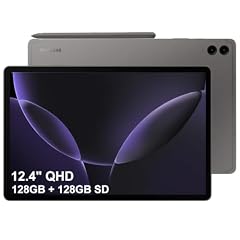
SAMSUNG Galaxy Tab S9 FE+ Plus Android Tablet
- Screen size
- 12 in or more
- Storage
- 256 GB
- Operating system
- Android
- Pen included
- Yes
$529.98 (as of 11/02/2026 00:55 PST - Details)
The Galaxy Tab S9 FE+ includes an S Pen in the box, making it a great choice for handwritten notes and drawing. It has a 12.4-inch screen, 256GB of storage, and Android 13 with Samsung One UI.
Pros
- S Pen included
- 256GB storage
- 12.4-inch display
- Android with expandable memory via microSD
Cons
- No stated rugged protection
- S Pen is included but keyboard is separate
- Only Wi-Fi, no cellular model in this listing
Good fit if
- Students who prefer writing by hand
- Artists who sketch on Android
Skip if
- You want a Windows tablet for desktop apps
- You need built-in 5G
Verdict: The Galaxy Tab S9 FE+ includes the S Pen and offers a large display for handwritten notes and drawing.
8 Best Android tablet with keyboard and cellular

Blackview 13 Inch Tablet Android 15
- Screen size
- 12 in or more
- Storage
- 256 GB
- Operating system
- Android
- Cellular
- Yes
- Pen included
- Yes
- Keyboard included
- Yes
$349.99 (as of 11/02/2026 06:37 PST - Details)
The Blackview 13-inch tablet runs Android 15, includes a keyboard case, and has cellular connectivity. With 256GB of storage and a 2K 90Hz display, it covers both productivity and entertainment needs.
Pros
- Keyboard included in the box
- Cellular connectivity for on-the-go use
- 256GB storage
- Android 15 with Gemini AI features
Cons
- No stated pen support
- Storage is fixed at 256GB, not expandable in this model
- Brand less established than Apple or Samsung
Good fit if
- Users who want a tablet that doubles as a laptop
- Those who need cellular data without a Wi-Fi hotspot
Skip if
- You need a stylus for drawing
- You prefer a premium build from a top-tier brand
Verdict: The Blackview 13-inch is a solid Android option that includes a keyboard and cellular, offering a versatile package for productivity on the move.
9 Best rugged tablet

Dell Pro Rugged 12
- Screen size
- 12 in or more
- Storage
- 256 GB
- Operating system
- Windows
- Rugged
- Yes
The Dell Pro Rugged 12 is designed for harsh environments, with a 12-inch display, 16GB RAM, and 256GB SSD. It runs Windows 11 Pro and is built to withstand drops, dust, and extreme temperatures.
Pros
- Rugged design for industrial use
- 256GB SSD storage
- 16GB RAM
- Windows 11 Pro
Cons
- Heavy and bulky
- Only 12-inch display, smaller than others
- High price due to rugged build
Good fit if
- Field workers in construction, logistics, or public safety
- People who need a tablet that survives drops and water
Skip if
- You want a thin, lightweight tablet for home use
- You are on a tight budget
Verdict: The Dell Pro Rugged 12 is the most dependable large-screen tablet for tough working conditions.
10 Best rugged Windows tablet

Panasonic Toughbook CF-33 MK3 Rugged Tablet
- Screen size
- 12 in or more
- Storage
- 512 GB or more
- Operating system
- Windows
- Cellular
- Yes
- Rugged
- Yes
$3,520.00 (as of 11/02/2026 00:30 PST - Details)
The Panasonic Toughbook CF-33 MK3 is a 12-inch rugged Windows tablet with a Core i7 12th Gen processor. It is fully sealed against dust and water and includes a removable keyboard option, making it ideal for field work.
Pros
- MIL-STD-810G rugged construction
- 12-inch QHD display
- Intel Core i7 processor
- Windows 10/11 Pro
Cons
- Very expensive for a tablet
- Only 12-inch screen, relatively small
- Heavy and hard to carry with one hand
Good fit if
- IT professionals and military personnel
- Outdoor workers who need Windows apps
Skip if
- You need a light tablet for daily commuting
- You don't need rugged protection
Verdict: The Toughbook CF-33 is a premium rugged Windows tablet built for the most demanding environments.
11 Best Windows tablet with keyboard

Fusion5 2 in 1 Laptop
- Screen size
- 12 in or more
- Storage
- 512 GB or more
- Operating system
- Windows
- Keyboard included
- Yes
$799.99 (as of 11/01/2026 22:57 PST - Details)
The Fusion5 12-inch tablet comes with a keyboard and runs Windows 11. It has 16GB RAM and 512GB SSD storage, providing enough power for typical office tasks and web browsing.
Pros
- Keyboard included in the bundle
- 512GB SSD storage
- 16GB RAM
- Windows 11 Home
Cons
- 12-inch screen, not as large as others
- No cellular option
- Less known brand
Good fit if
- Users who want a low-cost Windows tablet for light work
- People who need a laptop replacement for email and documents
Skip if
- You need a high-performance GPU
- You want a larger screen for media
Verdict: The Fusion5 12-inch is a budget-friendly Windows tablet that includes a keyboard and ample storage for daily tasks.
12 Best Windows tablet for business

Microsoft Surface Pro 10 Tablet
- Screen size
- 12 in or more
- Storage
- 512 GB or more
- Operating system
- Windows
$2,699.00 (as of 11/02/2026 00:05 PST - Details)
The Surface Pro 10 with 13-inch display, 32GB RAM, and 512GB SSD is built for enterprise productivity. It runs Windows 11 Pro and supports the Surface Pro keyboard and pen, making it a powerful 2-in-1.
Pros
- 32GB RAM for heavy multitasking
- 512GB SSD storage
- Windows 11 Pro
- 13-inch touchscreen
Cons
- No cellular connectivity in this model
- Keyboard and pen are sold separately
- Expensive for a tablet
Good fit if
- Business professionals who run memory-intensive software
- IT departments deploying Windows tablets across a company
Skip if
- You need a built-in keyboard
- You prefer a simpler Android or iOS tablet
Verdict: The Surface Pro 10 is the go-to Windows tablet for business users who require plenty of memory and a professional build.
13 Best 12-inch Android tablet
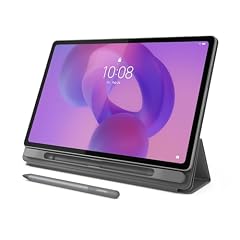
Lenovo Idea Tab Plus
- Screen size
- 12 in or more
- Storage
- 128 GB
- Pen included
- Yes
$279.00 (as of 11/01/2026 23:46 PST - Details) Typical price: $294.99, 5% off
The Lenovo Idea Tab Plus is a lightweight 12.1-inch Android tablet with a 2.5K IPS display and 128GB storage. It supports a stylus and runs MediaTek Dimensity 6400, making it a reliable choice for reading and light productivity.
Pros
- 12.1-inch 2.5K display
- Stylus support
- 128GB storage
- Lightweight design
Cons
- Only 128GB storage
- No cellular option
- Processor is mid-range
Good fit if
- Users who want a large Android screen for reading and browsing
- Those on a budget who need a stylus
Skip if
- You need 256GB or more storage
- You want a high-performance gaming tablet
Verdict: The Lenovo Idea Tab Plus offers a clear, large screen and pen support at an affordable price.
14 Best Android tablet for media consumption

The Xiaomi Poco Pad M1 features a 12.1-inch 2.5K display, octa-core processor, and four speakers, making it great for streaming movies and music. It has 256GB storage and a large 12000mAh battery.
Pros
- 12.1-inch 2.5K display
- 256GB storage
- Four speakers
- 12000mAh battery
Cons
- No pen support
- No cellular variant
- MIUI interface may not be for everyone
Good fit if
- Streaming enthusiasts who watch videos for hours
- Budget-conscious users who want a large screen
Skip if
- You need a stylus for drawing
- You prefer a stock Android interface
Verdict: The Poco Pad M1 is a big-screen Android tablet with strong media features and plenty of storage.
How they compare
| # | Tablet | Screen size | Storage | Operating system | Cellular | Pen included | Keyboard included |
|---|---|---|---|---|---|---|---|
| 1 | Apple iPad Pro 13-inch | 12 in or more | 256 GB | not stated | not stated | not stated | not stated |
| 2 | Samsung Galaxy Tab S10 Ultra 14 | 12 in or more | 256 GB | not stated | Yes | not stated | not stated |
| 3 | OnePlus Pad 3 13.2 Inch 512GB ROM + 16GB RAM WiFi + Bluetooth Tablet | 12 in or more | 512 GB or more | not stated | not stated | not stated | not stated |
| 4 | ASUS ROG Flow Z13 Gaming Tablet | 12 in or more | 512 GB or more | Windows | not stated | not stated | not stated |
| 5 | Microsoft Surface Pro 11 Copilot PC Bundle | 12 in or more | 512 GB or more | Windows | not stated | Yes | Yes |
| 6 | Apple iPad Air 13-inch | 12 in or more | 128 GB | not stated | not stated | not stated | not stated |
| 7 | SAMSUNG Galaxy Tab S9 FE+ Plus Android Tablet | 12 in or more | 256 GB | Android | not stated | Yes | not stated |
| 8 | Blackview 13 Inch Tablet Android 15 | 12 in or more | 256 GB | Android | Yes | Yes | Yes |
| 9 | Dell Pro Rugged 12 | 12 in or more | 256 GB | Windows | not stated | not stated | not stated |
| 10 | Panasonic Toughbook CF-33 MK3 Rugged Tablet | 12 in or more | 512 GB or more | Windows | Yes | not stated | not stated |
| 11 | Fusion5 2 in 1 Laptop | 12 in or more | 512 GB or more | Windows | not stated | not stated | Yes |
| 12 | Microsoft Surface Pro 10 Tablet | 12 in or more | 512 GB or more | Windows | not stated | not stated | not stated |
| 13 | Lenovo Idea Tab Plus | 12 in or more | 128 GB | not stated | not stated | Yes | not stated |
| 14 | XIAOMI Poco Pad M1 Only WiFi | 12 in or more | 256 GB | not stated | not stated | not stated | not stated |
Our selection method
We started with 43 tablets in our catalog that have a screen of 12 inches or more. From those, we shortlisted models with the most useful combinations of storage, pen support, keyboard support, and operating system. We compared the stated specifications from each product listing, including screen size, storage capacity, and whether the tablet includes a stylus, keyboard, or cellular connectivity. We did not test these devices; our picks are based on the manufacturer's published specifications and the information in the catalog. Prices are updated live from the store listing, so you can compare them at the moment you read this.
What matters when choosing
Screen size: bigger isn't always better
Large-screen tablets range from 12 inches to over 14 inches. A 12-inch model is easier to hold and lighter, while a 14-inch model is better for split-screen multitasking or watching movies. Consider how you will carry the tablet. If you plan to use it mostly at home on a stand, a larger display is fine. If you travel frequently, a 12-inch or 13-inch device may be more comfortable.
Storage capacity: how much do you really need?
Tablets are used for apps, photos, and offline media. 128GB is enough for everyday office work and streaming. 256GB is better for users who download many apps or games. If you store large video files or work with creative projects, look for 512GB or more. Expandable storage is rare on high-end tablets, so check whether the model you choose allows a microSD card.
Operating system: Android, Windows, or iPadOS
Your choice of OS determines which apps you can run. Android tablets offer the largest selection of apps and are often more affordable. Windows tablets run desktop programs like Office, Adobe, or engineering software, but they cost more and may have shorter battery life. iPadOS is polished and works well with the Apple ecosystem, but it does not run full desktop apps. Pick the OS that matches your existing devices and the software you rely on.
Pen and keyboard support
If you plan to take notes or draw, check that the tablet supports an active stylus. Some models include a pen in the box, such as the Samsung Galaxy Tab S9 FE+ or the Microsoft Surface Pro 11. For productivity, a detachable keyboard turns a tablet into a laptop replacement. Look for models that include the keyboard or have a reliable accessory ecosystem, especially if you type long documents.
Connectivity: Wi-Fi vs. cellular
Most tablets connect to Wi-Fi, but if you need internet on the go, consider a model with 5G or LTE. Cellular tablets can use SIM cards, but they often cost more and consume more battery. In this guide, models like the Samsung Galaxy Tab S10 Ultra, Blackview 13-inch, and Microsoft Surface Pro 11 5G (if included) offer cellular options. If you always have your phone hotspot, Wi-Fi-only may be enough.
Rugged design for tough environments
If the tablet will be used in construction, logistics, or the outdoors, look for a rugged model like the Dell Pro Rugged 12 or Panasonic Toughbook CF-33. These are built to survive drops, dust, and water, according to the manufacturers. They are heavier and more expensive, but they avoid costly repairs. Standard tablets are not designed for such conditions, so don't rely on a regular model for field work.
Questions
What makes a tablet 'large screen'?
We define a large-screen tablet as having a display of 12 inches or more. This size provides more room for multitasking, reading, and watching videos. In this guide, all picks meet that threshold, with the largest reaching 14.6 inches.
Can I replace a laptop with a large-screen tablet?
Many large tablets run Windows or Android with keyboard support, making them capable of handling office tasks and web apps. Windows tablets like the Surface Pro 11 can run full desktop software, so they can replace a laptop for many users. Android tablets are more limited but work well for browsing and email. Consider your need for specific software before making the switch.
How much storage do I need for a tablet?
For basic use, 128GB is sufficient. If you download a lot of apps, games, or offline movies, 256GB or more is safer. Users who edit video or store large photo libraries should choose 512GB or higher. Expandable storage is not available on all tablets, so check the specifications.
What is the difference between Android, Windows, and iPadOS tablets?
Android tablets offer a wide range of apps and are often less expensive. Windows tablets run desktop software and can be full laptop replacements, but they are heavier and use more power. iPadOS tablets (from Apple) are known for their polished apps and long-term updates, but they cannot run desktop Windows programs. Choose based on the apps you need and your existing devices.
Are rugged tablets worth the extra cost?
Rugged tablets are worth the premium if you work in environments where drops, dust, or water are common. They are certified to meet military standards and have reinforced frames. For indoor use or commuting, a standard tablet is lighter and cheaper, and you can add a protective case instead.
Change log
- : First published.