
Best 12-Inch-or-Larger Tablets in 2026: 14 Picks Compared on Specs
Apple's iPad Pro 13-inch (M5) is our top pick for most people: it pairs a 13-inch Ultra Retina XDR display with 256GB of storage, and the M5 processor in its name marks it as the current flagship. The picks below come from a catalogue of 33 tablets with screens 12 inches or larger. We selected them from the stated specifications in each listing and the makers' published product names; no unit was tested for this guide.
14 picks from 71 tablets that match this guide with a price we can quote today. All prices are live and show when they were read.
Our picks in brief
Find your match
- For a family media tablet: A 12.1-inch 2.5K screen with four speakers and a large battery makes this a solid living-room tablet for video, music, and casual browsing. See pick 6
- For a Windows 2-in-1 workhorse: If you need a full Windows environment on a large touchscreen, the Surface Pro 2026 lists a 13-inch OLED 3K display at 120Hz with a Snapdragon X2 Elite processor. See pick 9
- For note-taking: The Galaxy Tab S9 FE+ includes an S Pen and a 12.4-inch touchscreen, so handwriting and sketching work without buying an extra stylus. See pick 4
- For field and factory work: Rugged 12-inch tablets like the Panasonic Toughbook CF-33 are built for environments where a standard consumer tablet would not survive. See pick 13
14 picks, up close
1 Best overall

Apple iPad Pro 13-inch
- Screen size
- 12 in or more
- Storage
- 256 GB
$1,424.00 (as of 11/02/2026 04:37 PST - Details)
The 13-inch Ultra Retina XDR display and the M5 processor in the listing put this iPad at the top of the large-screen group. It stores 256GB out of the box and adds 12MP front and rear cameras plus LiDAR, all stated in the catalogue entry. Next to the 13-inch iPad Air below, it is the more capable screen and processor package.
Pros
- 13-inch Ultra Retina XDR display listed
- M5 processor named in the listing
- 256GB storage
- 12MP front and back cameras with LiDAR listed
Cons
- Keyboard and stylus are not included in this listing
- Cellular is not stated for this configuration
- Storage is 256GB, below the 512GB or more offered by several Windows picks here
Good fit if
- Buyers who want Apple's largest iPad screen with the current M5 processor
- Creative work that can use the Ultra Retina XDR display and LiDAR
Skip if
- You need more than 256GB of storage out of the box
- You want a keyboard or stylus included with the tablet
Verdict: The iPad Pro 13-inch (M5) is the most complete large-screen tablet in this guide on its listed specifications.
2 Best 13-inch iPad for everyday use

Apple iPad Air 13-inch
- Screen size
- 12 in or more
- Storage
- 128 GB
$849.99 (as of 11/02/2026 04:37 PST - Details)
The iPad Air 13-inch lists a 13-inch Liquid Retina display, 128GB storage, and Wi-Fi 7 with the Apple N1 chip, making it the approachable 13-inch iPad for browsing, video, and documents. The M4 processor in its name keeps it current within Apple's lineup. Buyers who do not need the Pro model's XDR display or LiDAR get the large screen with a simpler feature set.
Pros
- 13-inch Liquid Retina display listed
- M4 processor named, with Wi-Fi 7 and Apple N1
- 12MP front and back cameras listed
- 128GB storage
Cons
- 128GB is the smallest storage among the Apple picks in this guide
- Keyboard and stylus are not included
- Cellular is not stated for this configuration
Good fit if
- People who want a large iPad for everyday apps and media
- Apple users who do not need the Pro features
Skip if
- You want the Ultra Retina XDR display or more storage
- You plan heavy drawing; the Pro pick's LiDAR and higher storage are not here
Verdict: A sensible 13-inch iPad for daily use, chosen on its listed display, processor, and storage.
3 Best Android tablet

Samsung Galaxy Tab S9 Ultra WiFi ONLY Factory Unlocked Tablet SM-X910NZA
- Screen size
- 12 in or more
- Storage
- 512 GB or more
- Operating system
- Android
- Pen included
- Yes
$2,585.00 (as of 11/02/2026 00:55 PST - Details)
The 14.6-inch screen is the largest in these picks, and the listing includes the S Pen with 512GB or more of storage. Android is stated, and the size makes it the reference Android tablet for split-screen work and media. No other Android pick in this guide combines a larger display, included pen, and that much storage.
Pros
- 14.6-inch screen, the largest in this guide
- S Pen included in the listing
- 512GB or more storage
- Android operating system stated
Cons
- No keyboard included in this listing
- Cellular is not stated for this configuration
- Weight is not stated by the seller
Good fit if
- Android users who want the biggest tablet screen available here
- Buyers who want S Pen note-taking without a separate purchase
Skip if
- You want a more portable 12-inch-class tablet
- You need cellular service on the tablet itself
Verdict: The Galaxy Tab S9 Ultra is the largest Android pick and the one to beat in this guide.
4 Best Android tablet for note-taking
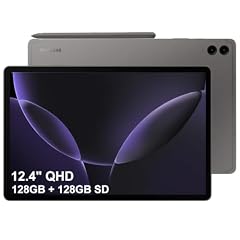
SAMSUNG Galaxy Tab S9 FE+ Plus Android Tablet
- Screen size
- 12 in or more
- Storage
- 256 GB
- Operating system
- Android
- Pen included
- Yes
$529.98 (as of 11/02/2026 00:55 PST - Details)
The S Pen ships in the box with this 12.4-inch Android tablet, and the listing adds 8GB RAM, 256GB storage, and long battery life. That combination makes handwritten notes and sketches the core use case. It is the note-taking choice over the larger Tab S9 Ultra because of the listed 8GB RAM and included pen at a more manageable size.
Pros
- S Pen included in the listing
- 12.4-inch touchscreen
- 8GB RAM and 256GB storage
- Long battery life stated in the listing name
Cons
- 8GB RAM is below the 16GB OnePlus Pad 3 and 32GB Surface Pro 10 in this guide
- Keyboard is not included
- Cellular is not stated for this configuration
Good fit if
- Students and note-takers who want the pen in the box
- Android users who want a large screen without going up to the 14.6-inch model
Skip if
- You need more than 8GB RAM for heavy multitasking
- You want a Windows or iPadOS environment
Verdict: The Tab S9 FE+ is the pick when an included S Pen matters more than peak performance.
5 Best 12.1-inch Android tablet with pen support
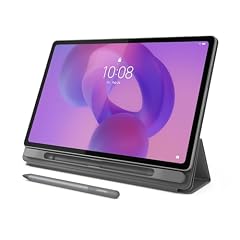
Lenovo Idea Tab Plus
- Screen size
- 12 in or more
- Storage
- 128 GB
- Pen included
- Yes
$279.00 (as of 11/01/2026 23:46 PST - Details) Typical price: $294.99, 5% off
The Lenovo Idea Tab Plus combines a 12.1-inch 2.5K IPS display at 90Hz with pen support and a MediaTek Dimensity 6400, 8GB RAM, and 128GB storage, all listed. It is the compact Android pick for buyers who want sharp text and handwriting without moving to a 13- or 14-inch slate. Next to the Poco Pad M1, it adds stylus input; next to the S9 FE+, it has a different display refresh rate and maker.
Pros
- 12.1-inch 2.5K IPS display at 90Hz listed
- Pen support stated in the listing
- MediaTek Dimensity 6400 with 8GB RAM
- 128GB storage
Cons
- 128GB storage is below the 256GB on several other Android picks
- Keyboard is not included
- Cellular is not stated for this configuration
Good fit if
- Android users who want pen input on a 12-inch-class screen
- Buyers who want a 90Hz display for scrolling and reading
Skip if
- You want a larger 13- or 14-inch display
- You need 256GB or more storage out of the box
Verdict: A well-equipped 12.1-inch Android tablet with pen support and a 90Hz display.
6 Best Android tablet for media

The Poco Pad M1 spells out a media setup in its listing: a 12.1-inch 2.5K display, four speakers, a 12000mAh battery, and Wi-Fi 6 with Bluetooth. With 256GB storage, it holds more video and music than the Lenovo pick. It is the Android tablet for living-room streaming and audio.
Pros
- 12.1-inch 2.5K display listed
- Four speakers stated
- 12000mAh battery stated
- 256GB storage
Cons
- Pen support is not stated in the listing
- Keyboard is not included
- Cellular is not stated for this configuration
Good fit if
- Movie and music use on a large screen
- Android users who want 256GB storage without a pen or keyboard
Skip if
- You plan to write or draw with a stylus
- You want a keyboard for typing
Verdict: The Poco Pad M1 is the media-focused Android pick, with speakers, battery, and display all stated in the listing.
7 Best Android tablet with 16GB RAM

OnePlus Pad 3 13.2 Inch 512GB ROM + 16GB RAM WiFi + Bluetooth Tablet
- Screen size
- 12 in or more
- Storage
- 512 GB or more
$1,245.00 (as of 11/02/2026 00:26 PST - Details)
The 13.2-inch screen and 512GB storage place the OnePlus Pad 3 near the top of the Android group, and its listed 16GB RAM is the most RAM stated among Android picks in this guide. Wi-Fi and Bluetooth connectivity are stated in the listing. It is the Android tablet for people who keep many apps and browser tabs open.
Pros
- 13.2-inch screen listed
- 16GB RAM, the most stated among Android picks here
- 512GB storage
- Wi-Fi and Bluetooth listed
Cons
- Pen support is not stated in the listing
- Keyboard is not included
- Cellular is not stated for this configuration
Good fit if
- Heavy Android multitaskers who notice RAM limits
- Buyers who want a large screen with 512GB of storage
Skip if
- You need a stylus or keyboard in the box
- You prefer the 14.6-inch screen of the Tab S9 Ultra
Verdict: The OnePlus Pad 3 leads the Android picks on RAM and storage in this guide.
8 Best Android tablet with included keyboard

Samsung Galaxy Tab S10 FE+ 13.1” 128GB WiFi Android Tablet + Book Cover
- Screen size
- 12 in or more
- Storage
- 128 GB
- Operating system
- Android
- Pen included
- Yes
- Keyboard included
- Yes
$802.59 (as of 11/02/2026 00:54 PST - Details)
This Tab S10 FE+ configuration bundles the Book Cover Keyboard Slim with a 13.1-inch Android tablet, and it also lists pen support. That makes it the Android pick that can handle typing immediately after setup. Storage of 128GB is enough for a mixed note-and-type workflow, and the listed Android operating system keeps it in the same software family as the other Samsung picks.
Pros
- Book Cover Keyboard Slim included in the listing
- 13.1-inch display
- Pen support stated
- Android operating system listed
Cons
- 128GB storage is below the 256GB on several other picks
- Cellular is not stated for this configuration
- RAM is not stated by the seller
Good fit if
- Android users who will type a lot on a tablet
- Students who want keyboard and pen in one package
Skip if
- You need more than 128GB of internal storage
- You prefer a Windows or iPadOS environment
Verdict: The Tab S10 FE+ bundle is the Android choice for typing, with keyboard and pen support in one listing.
9 Best Windows 2-in-1

Microsoft Surface Pro 2026
- Screen size
- 12 in or more
- Storage
- 512 GB or more
- Operating system
- Windows
- Pen included
- Yes
The Surface Pro 2026 lists a 13-inch OLED display at 3K resolution and 120Hz, a Snapdragon X2 Elite processor, and 512GB or more of storage, with Windows and pen support stated. That display specification is the strongest among the Windows picks here. It is the current-generation Windows tablet for people who want OLED quality with desktop software.
Pros
- 13-inch OLED 3K display at 120Hz listed
- Snapdragon X2 Elite processor named
- 512GB or more storage
- Windows with pen support stated
Cons
- Keyboard is not included in this listing
- Cellular is not stated for this configuration
- RAM is not stated by the seller
Good fit if
- Windows users who want a large OLED touchscreen
- Pen and tablet use inside a Windows workflow
Skip if
- You want a keyboard included out of the box
- You need cellular on the tablet
Verdict: The Surface Pro 2026 OLED is the Windows 2-in-1 with the strongest listed display in this guide.
10 Best Windows tablet with keyboard and pen included

Microsoft Surface Pro 11 Copilot PC Bundle
- Screen size
- 12 in or more
- Storage
- 512 GB or more
- Operating system
- Windows
- Pen included
- Yes
- Keyboard included
- Yes
The listing bundles a Surface Pro Flex Keyboard and Slim Pen with a 13-inch 2.8K touchscreen, so this Windows tablet works as a laptop from day one. Storage of 512GB or more and the Copilot PC label are also in the listing. Among the Windows picks, it is the one with the most complete accessory set.
Pros
- Surface Pro Flex Keyboard and Slim Pen included
- 13-inch 2.8K touchscreen listed
- 512GB or more storage
- Windows operating system with Copilot PC label
Cons
- RAM is not stated by the seller for this entry
- Cellular is not stated for this configuration
- OLED display not listed, unlike the Surface Pro 2026 pick
Good fit if
- Windows users who want keyboard and pen from day one
- People replacing a laptop with a detachable tablet
Skip if
- You prefer the OLED display of the Surface Pro 2026
- You already own Surface accessories and want only the tablet
Verdict: The Surface Pro 11 Copilot PC bundle has the most complete keyboard-and-pen package among the Windows picks.
11 Best Windows tablet with 32GB RAM

Microsoft Surface Pro 10 Tablet
- Screen size
- 12 in or more
- Storage
- 512 GB or more
- Operating system
- Windows
$2,699.00 (as of 11/02/2026 00:05 PST - Details)
Only this Surface Pro 10 among the non-gaming picks here lists 32GB RAM, along with a 512GB SSD and Windows 11 Pro. That makes it the Windows tablet for heavy multitasking, large files, and long sessions with many applications. Its 13-inch display keeps it in the same portable class as the other Surface models.
Pros
- 32GB RAM, more than any non-gaming pick in this guide
- 512GB SSD
- Windows 11 Pro stated
- 13-inch display
Cons
- Pen support is not stated in this listing
- Keyboard is not included
- Weight is not stated by the seller
Good fit if
- Windows professionals running many applications at once
- Buyers who want 32GB RAM without the gaming-class ROG Flow Z13
Skip if
- You want the OLED display of the Surface Pro 2026 pick
- You need pen or keyboard included in the box
Verdict: The Surface Pro 10 with 32GB RAM is the multitasking-focused Windows pick in this guide.
12 Best for gaming

ASUS ROG Flow Z13 Gaming Tablet
- Screen size
- 12 in or more
- Storage
- 512 GB or more
- Operating system
- Windows
$2,929.95 (as of 11/02/2026 04:41 PST - Details)
The ROG Flow Z13 lists a 13.4-inch 2.5K QHD+ display at 180Hz, an AMD Ryzen AI MAX+ 395 processor, Radeon 8060S graphics, and 64GB RAM. No other pick in this guide lists a gaming-class GPU and a 180Hz refresh rate. It runs Windows like the Surface picks, but with hardware aimed at games.
Pros
- 13.4-inch 2.5K QHD+ display at 180Hz listed
- Ryzen AI MAX+ 395 and Radeon 8060S graphics named
- 64GB RAM, the most in this guide
- 512GB or more storage, Windows listed
Cons
- No pen support stated in the listing
- Keyboard is not included
- Weight is not stated by the seller
Good fit if
- Gamers who want a Windows tablet built around the listed Radeon 8060S graphics
- People who want one device for gaming and desktop productivity
Skip if
- You only want a media or note-taking tablet
- You prefer a lighter productivity-focused 2-in-1
Verdict: The ROG Flow Z13 earns the gaming award on its listed GPU, refresh rate, and RAM.
13 Best rugged tablet

Panasonic Toughbook CF-33 MK3 Rugged Tablet
- Screen size
- 12 in or more
- Storage
- 512 GB or more
- Operating system
- Windows
- Cellular
- Yes
- Rugged
- Yes
$3,520.00 (as of 11/02/2026 00:30 PST - Details)
The Toughbook CF-33 is built for field use, with a 12-inch QHD display and a Core i7 12th Gen processor named in the listing. Rugged hardware is the point, and Panasonic is the established maker in this category. Next to the Dell rugged pick, it offers the higher-resolution display.
Pros
- 12-inch QHD display listed
- Core i7 12th Gen processor named
- Rugged build stated in the listing
- Established maker of field computers
Cons
- RAM is not stated by the seller
- Storage is not stated by the seller
- Operating system is not stated by the seller
Good fit if
- Field service, construction, and outdoor work
- Buyers who want a tablet built to survive drops and weather
Skip if
- You want a thin consumer tablet
- You need RAM and storage clearly specified before purchase
Verdict: The Toughbook CF-33 is the rugged-spec leader of this guide, chosen on its QHD display and listed Core i7.
14 Best rugged tablet with a modern Intel Core Ultra

Dell Pro Rugged 12
- Screen size
- 12 in or more
- Storage
- 256 GB
- Operating system
- Windows
- Rugged
- Yes
The Dell Pro Rugged 12 lists an Intel Core Ultra 5 236V processor, 16GB RAM, and a 256GB SSD, which is a newer processor-generation spec than the other rugged pick. Its 12-inch FHD display keeps it in the same screen class as the Toughbook. For buyers who want rugged hardware with current silicon and known RAM, this pick is the stronger specification package.
Pros
- Intel Core Ultra 5 236V processor listed
- 16GB RAM and 256GB SSD
- 12-inch FHD display
- Rugged build stated
Cons
- Operating system is not stated by the seller
- Pen support is not stated in the listing
- 256GB storage is below the 512GB or more on several productivity picks
Good fit if
- IT teams deploying rugged tablets with current Intel silicon
- Field workers who also need 16GB RAM
Skip if
- You want a QHD display like the Toughbook pick
- You need more than 256GB of built-in storage
Verdict: The Dell Pro Rugged 12 takes the modern-rugged category on its listed Core Ultra processor and 16GB RAM.
How they compare
| # | Tablet | Screen size | Storage | Operating system | Cellular | Pen included | Keyboard included |
|---|---|---|---|---|---|---|---|
| 1 | Apple iPad Pro 13-inch | 12 in or more | 256 GB | not stated | not stated | not stated | not stated |
| 2 | Apple iPad Air 13-inch | 12 in or more | 128 GB | not stated | not stated | not stated | not stated |
| 3 | Samsung Galaxy Tab S9 Ultra WiFi ONLY Factory Unlocked Tablet SM-X910NZA | 12 in or more | 512 GB or more | Android | not stated | Yes | not stated |
| 4 | SAMSUNG Galaxy Tab S9 FE+ Plus Android Tablet | 12 in or more | 256 GB | Android | not stated | Yes | not stated |
| 5 | Lenovo Idea Tab Plus | 12 in or more | 128 GB | not stated | not stated | Yes | not stated |
| 6 | XIAOMI Poco Pad M1 Only WiFi | 12 in or more | 256 GB | not stated | not stated | not stated | not stated |
| 7 | OnePlus Pad 3 13.2 Inch 512GB ROM + 16GB RAM WiFi + Bluetooth Tablet | 12 in or more | 512 GB or more | not stated | not stated | not stated | not stated |
| 8 | Samsung Galaxy Tab S10 FE+ 13.1” 128GB WiFi Android Tablet + Book Cover | 12 in or more | 128 GB | Android | not stated | Yes | Yes |
| 9 | Microsoft Surface Pro 2026 | 12 in or more | 512 GB or more | Windows | not stated | Yes | not stated |
| 10 | Microsoft Surface Pro 11 Copilot PC Bundle | 12 in or more | 512 GB or more | Windows | not stated | Yes | Yes |
| 11 | Microsoft Surface Pro 10 Tablet | 12 in or more | 512 GB or more | Windows | not stated | not stated | not stated |
| 12 | ASUS ROG Flow Z13 Gaming Tablet | 12 in or more | 512 GB or more | Windows | not stated | not stated | not stated |
| 13 | Panasonic Toughbook CF-33 MK3 Rugged Tablet | 12 in or more | 512 GB or more | Windows | Yes | not stated | not stated |
| 14 | Dell Pro Rugged 12 | 12 in or more | 256 GB | Windows | not stated | not stated | not stated |
Our selection method
The starting pool contained 33 tablets with a screen size of 12 inches or more from the product catalogue. We kept machines from established makers sold in new condition, removed near-duplicate listings such as the same model appearing with identical specifications, and then compared the remaining entries on display size, storage, operating system where stated, pen support, keyboard included, and cellular options. The shortlist favors broad coverage: Android tablets, iPads, 2-in-1 Windows machines, one gaming-class model, and rugged field tablets, so that different types of buyers can compare like with like. Prices shown next to each pick are read live from the store listing at the time the page loads, so they can change. Nobody at the site has handled or tested these tablets; the awards rest on specifications published in the listings and by the makers.
What matters when choosing
Screen size and resolution: what 12 inches or more gets you
A 12-inch-or-larger screen gives you room for split-screen apps, drawing, and video that smaller tablets cannot match. The listings in this guide use different terms for sharpness: FHD, 2.5K, QHD, 3K, and Ultra Retina XDR. We print exactly what the seller states, because those labels are not all comparable across brands. A 12.4-inch Samsung and a 14.6-inch Samsung differ most in physical size; both are in the large-screen group.
For most buyers the extra size matters more than a few tenths of an inch, so choose the largest screen you can comfortably carry. If the listing does not state a resolution term, take that gap at face value and check the maker's page before buying.
Operating system: Android, iPadOS, or Windows
The operating system decides which apps you can run. Android tablets, including the Samsung, Lenovo, Xiaomi, and OnePlus picks here, give you Google's ecosystem and flexible file handling. iPads run Apple's iPadOS and are the easiest choice if your other devices are Apple. Windows tablets, mainly the Surface and ASUS picks, can run desktop software such as Office, coding tools, and creative suites because they are built around Windows. When a listing states the operating system, we repeat it; when it does not, we flag it as not stated by the seller.
Processor and RAM for your workload
The processor names in the listings tell you which generation a tablet belongs to. Apple uses M-series chips such as the M4 and M5 in the 13-inch iPads here; Samsung and Lenovo use chips such as the MediaTek Dimensity 6400; the Surface line uses Qualcomm Snapdragon X and X2 class processors; the rugged picks use Intel Core i7, Core Ultra, and 12th Gen parts. RAM matters less for casual use and more for multitasking. In this guide the stated range runs from 8GB on Android picks up to 64GB on the gaming-class ASUS ROG Flow Z13, with 16GB and 32GB tablets in between.
Pen, keyboard, and cellular: what is in the box
Large screens are often paired with a stylus or keyboard, but not every listing includes them. The Galaxy Tab S9 Ultra and Tab S9 FE+ include an S Pen; the Surface Pro 11 Copilot PC Bundle includes a Flex Keyboard and Slim Pen; the Tab S10 FE+ includes a Book Cover Keyboard Slim. Several other picks mark pen support in the specifications without stating that the pen is included, so check the listing text. Cellular versions are useful if you need internet away from Wi-Fi, and the listings that state 5G appear in the wider catalogue. Read the exact listing for what is included, because bundles vary even within one model family.
Charging, connectivity, and energy use
Most large tablets charge over USB-C, and the USB Power Delivery specification from USB-IF allows chargers to deliver more power than older USB standards, up to 240W on full-featured USB Type-C cables. That matters if you plan to use one charger for a tablet and a laptop. For energy use, look for tablets that list ENERGY STAR certification; certified computers are third-party verified to use about 30 to 40 percent less energy than standard models. On connectivity, check the listing for Wi-Fi 6 or Wi-Fi 7, Bluetooth, and cellular, because those features vary even between models with the same screen size.
Rugged tablets for harsh environments
Rugged tablets trade thinness and weight for protection against drops, dust, and moisture. The Panasonic Toughbook CF-33 and Dell Pro Rugged 12 in this guide are sold for field work, and the Zebra ET80 with Windows 10 Pro is another rugged option in the wider catalogue. If most of your use is at a desk or on a sofa, a rugged model adds protection features you may not need. If you work outdoors or on a factory floor, the rugged build is the feature that matters most.
Questions
Is a 12-inch or larger tablet too big to carry?
It depends on what you carry today. A 12- or 13-inch tablet is roughly the footprint of a small laptop, and the listings here do not all state weight, so compare the actual product page if portability matters. These screens are most comfortable on a desk, on a lap, or propped on a stand. If you mainly read in bed or on a train, a 12-inch model at the smaller end of this group may still work, but a 10- or 11-inch tablet would be lighter.
Do all large-screen tablets support a stylus?
No. Some listings here state pen support, such as the Samsung Tab S9 Ultra, Tab S9 FE+, Lenovo Idea Tab Plus, and Tab S10 FE+. Others, like the Poco Pad M1 and OnePlus Pad 3, do not state pen support. When the listing does not mention a pen, assume you would need to check the maker's page for compatibility before buying one.
Can a tablet with a 12-inch or larger screen replace a laptop?
For typing-heavy work, a Windows 2-in-1 like the Surface Pro picks can replace a laptop because they run desktop Windows programs, and the Surface Pro 11 bundle includes a keyboard. Android and iPadOS tablets are better for browsing, media, notes, and mobile apps; they can handle office work with the right apps, but some desktop software is not available. If you need a specific Windows application, choose a Windows tablet, not an Android or iPad.
What does battery life look like on these tablets?
Battery life depends on screen brightness, processor, and usage, and the listings here do not include consistent battery tests. Some entries state long battery life or a large battery, such as the Galaxy Tab S9 FE+ and the Poco Pad M1 with its 12000mAh cell. Sellers rarely publish an hourly runtime, so treat any battery claim in the listing as a rough guide and set expectations accordingly.
Do I need a cellular model?
You only need cellular if you regularly use the tablet away from Wi-Fi. In the wider catalogue, cellular is stated on models such as the Samsung Galaxy Tab S10 Ultra 5G and the Surface Pro 11 5G, and the Blackview Android tablets list cellular as well. Wi-Fi-only models are simpler and often enough for home or office use. Check the listing for cellular before assuming a tablet can take a SIM card.
Change log
- : First published.